
LINE Official Account
Configure the organization LINE Official Account and webhook
Overview
LINE is one Omnichannel platform. Use this guide for LINE Official Account fields; connect the other apps from the same settings page.
app.wellicle.com
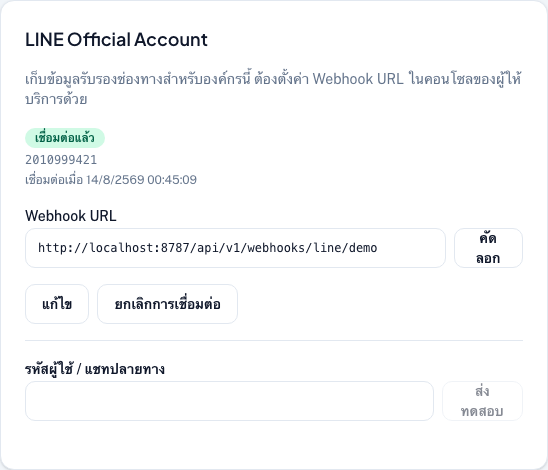
Open LINE settings
Go to /org/{slug}/settings/omnichannel and open the LINE Official Account card.
Connect LINE OA
Copy values from LINE Developers
From your Messaging API channel, copy Channel ID and Channel secret (Basic settings)
Connect in Wellicle
Enter Channel ID (numeric) and Channel secret, then choose Connect. Wellicle validates the credentials with LINE and issues access tokens when sending — you do not need a long-lived access token.
Confirm the webhook
Wellicle registers the webhook URL on connect when possible. If not, copy the URL shown on the card, paste it in LINE Developers Console → Messaging API, and enable Use webhook
Send a test
Enter a destination user ID and choose Send test
Tips
- Channel ID must be 5–20 digits; channel secret at least 8 characters
- See Omnichannel for Telegram, Facebook, WhatsApp, and WeChat